File Descriptors
- tags
- Systems
To read: https://x.com/7etsuo/status/1840268043982909838 🌟
FAQ
sharing of fd w child, how?
- Each running process has its own fd table. But this is an exception with child processes.
- After
fork()or aclone() (wo CLONE_FILES set), a child and a parent have an equal set of fd(s)
What is file offset?
- file offset == location for next
read()/write()
How to set? how is this related to ulimit nofile?
- See How to Increase Number of Open Files Limit in Linux
- set
- system wide
cat /proc/sys/fs/file-maxsysctl -w fs.file-max=500000(/etc/sysctl.conf)
- ulimit
- See ulimits
- system wide
Intro
FD is not related to an inode, except as such may be used internally by particular file-system driver.
- FD is an
abstract indicatorto access afileorother input/output resources.- It’s 100% opaque +ve integers
- Even if its called “file” descriptor it can be indicator to something which is not a file too (but in unix everything is a file makes it fuzzy)
- Up to V7 UNIX (1973-1979[2,3]), the file description table could literally only reference a file on disk, UNIX domain/TCP/UDP sockets weren’t introduced until 4.2BSD.
- It decouples a file path (more correctly, an inode) from a file object inside a process and the Linux kernel.
- Allows for opening the same file
- An arbitrary number of times
- For different purposes
- With various flags
- At different offsets.
- Each running program has its own list of file descriptors; they aren’t shared.
std[in,out,err]
/dev/stdin,/dev/stdout,/dev/stderrarefilenamesforfdfor each process./proc/self/fdinfocontains per file descriptor info.
λ ll /dev/ | rg fd
lrwxrwxrwx      13 root      13 Mar 18:45  fd -> /proc/self/fd
lrwxrwxrwx      15 root      13 Mar 18:45  stderr -> /proc/self/fd/2
lrwxrwxrwx      15 root      13 Mar 18:45  stdin -> /proc/self/fd/0
lrwxrwxrwx      15 root      13 Mar 18:45  stdout -> /proc/self/fd/1
λ ll /proc/self/fd/
lrwx------    64 geekodour 15 Mar 15:44  0 -> /dev/pts/1
lrwx------    64 geekodour 15 Mar 15:44  1 -> /dev/pts/1
lrwx------    64 geekodour 15 Mar 15:44  2 -> /dev/pts/1
λ lsof -d 0 +fg # same fd points to different files
COMMAND      PID      USER   FD   TYPE FILE-FLAG DEVICE SIZE/OFF    NODE NAME
systemd      663 geekodour    0r   CHR        LG    1,3      0t0       4 /dev/null
emacs        676 geekodour    0r   CHR        LG    1,3      0t0       4 /dev/null
alacritty    933 geekodour    0u   CHR  RW,AP,LG    4,1      0t0      20 /dev/tty1
fish         947 geekodour    0u   CHR     RW,ND  136,0      0t0       3 /dev/pts/0
λ cat /proc/self/fdinfo/{0,1,2}
pos:    0
flags:  02002
mnt_id: 29
ino:    7
TODO The system fd and per process fd table and inode
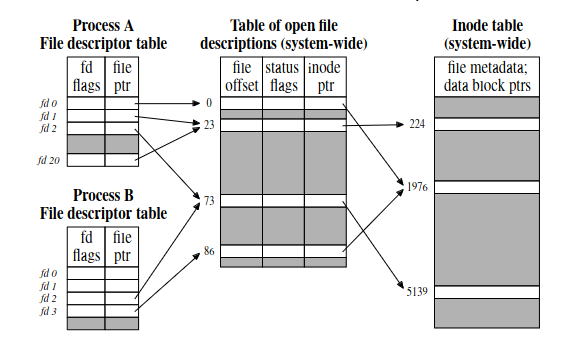
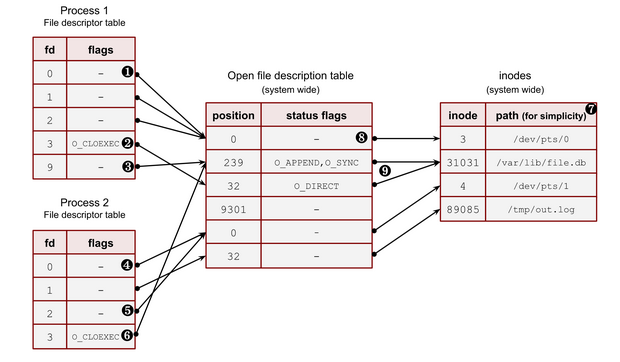
Related syscalls :
dup, dup2, dup3, fcntl(also allows us to specify certain fd number)
The tables
| Name | Level | Other Names |
|---|---|---|
| descriptor table | per process | Per process table |
| file table | system wide | Open FD(OFD) table, Global FD table, System FD table |
| v-node table | system wide | inode table |
Open FD table (OFD table)
It’s an abstract thing, no actual entity in the kernel.
- Each entry stores
statusandpositionof the fd.
Per process FD table
This is a tangible thing
- Multiple FDs in the same process referring to the same OFD. (
man 2 dup) - Multiple processes w their own FDs referring to the same OFD. (
man 2 fork)- If parent and child now start writing to the fd, the kernel will handle the synchronization
- Multiple processes w their own FDs referring to distinct OFD, but OFD points to same inode. (
man 2 openby both processes)
TODO Shared and Private
| Properties/Attributes | Global Table | Per Process Table |
|---|---|---|
Operation Flag(O_CLOEXEC) |
Private | |
| Ref. to Global Table | Private | |
| File offset | Shared | Private (mapped) |
| Access Mode(rw) | Shared | Private(mapped) |
| Ref. to inode | Shared |
- Some properties are stored in the OFD and some in per process
- If we change property of a FD from one process, and its shared, changes will reflect in other.
FD Internals
- Threads
have
task_struct, it points tofiles_structwhich points tofilestruct.filecontains flags, position, inode etc.
Usage of FD
Creating FD
- Using
open,openat,createetc. it’ll create the fd in both the tables. - When we create new fd, kernel grantees to return the lowest positive number not currently opened by the calling process. i.e if we close a fd of a file, the next fd we create will get the fd of the file that we closed.