Subnetting
- tags
- Networking
IP Addressing
Classes
Classes are just memorization, no math involved here.
| Class | Range | Extended Range | Default CIDR |
|---|---|---|---|
| A | 1-126 | 1.0.0.1 - 126.255.255.254 | /8 |
| B | 128-191 | 128.1.0.1 - 191.155.255.254 | /16 |
| C | 192-223 | 192.0.1.1 - 223.255.254.254 | /24 |
| D (Multicasting) | 224-239 | 244.0.0.0 - 239.255.255.255 | N/A |
| E (Experimental) | 240-255 | 240.0.0.0 - 254.255.255.254 | N/A |
- When we classify (A,B,C etc) an IP address, we only look at the 1st Octet.
0.0.0.0: Default127.0.0.0-127.255.255.255: Loopback range (127.0.0.0/8)- CIDR has nothing to do with the class of the address
- You can have
class Aaddress with/16(subnetted) - You can have
class Aaddress with/24(subnetted)
- You can have
- Has 4 Octets
XXXX.XXXX.XXXX.XXXX(32 bits)
Private ranges
Private : Not routable on the internet (NAT comes in)
| Class | Private Range | Default CIDR |
|---|---|---|
| A | 10.0.0.0 - 10.255.255.255.255 | /8 |
| B | 172.16.0.0 - 172.31.255.255 | /12 |
| C | 192.168.0.0 - 192.168.255.255 | /16 |
CIDR
Find Range from Mask
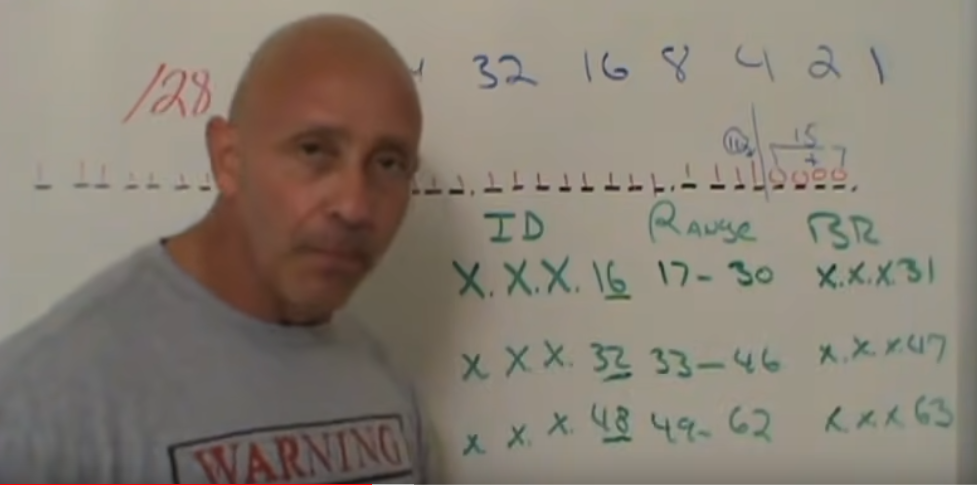
- Example mask:
/28 - Binary:
11111111.11111111.11111111.11110000 - Network Increment: 16 (Because line gets drawn at 16)
- Hosts: 15 (0000 : 15)
| Network ID | Broadcast Address | Range |
|---|---|---|
| X.X.X.16 | X.X.X.31 | 17-30 |
| X.X.X.32 | X.X.X.47 | 33-46 |
| X.X.X.48 | X.X.X.63 | 49-62 |
| … |
Find Mask from no. of hosts
Start counting from the right to left, then subtract 2(Broadcast+NetworkID)
- Example no. of hosts: 100
11111111.11111111.11111111.10000000(Allows 127-2 = 125 Hosts)- Subnet :
255.255.255.128 /25will be the Mask.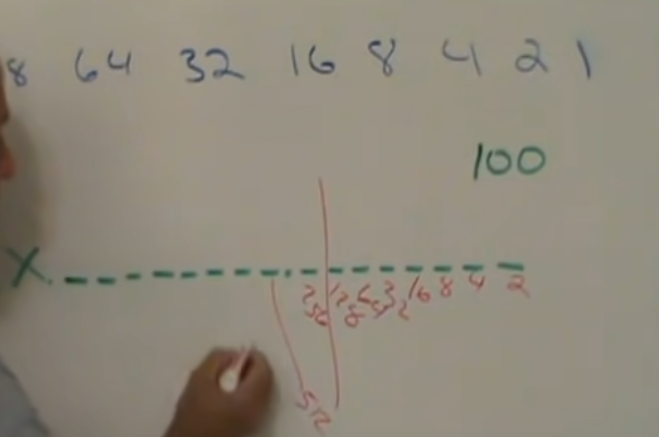 NOTE: Idk why the screenshot starts from
 2.
TODO: Get the following checked by someone who understands networking
| Network ID | B.cast Addr | Range |
|---|---|---|
| X.X.X.128 | X.X.X.255 | 129-254 |
If using 0 network
| Network ID | B.cast Addr | Range |
|---|---|---|
| X.X.X.0 | X.X.X.127 | 1-126 |
| X.X.X.128 | X.X.X.255 | 129-254 |
Find Mask for no. of subnets and no.of hosts
Start counting from the left to right, then subtract 2(Broadcast+NetworkID)
- Example no. of subnets : 300
- Example no. of hosts : 100
11111111.11111111.11111111.10000000(Allows 128-2 = 126 Hosts)/25will be the Mask.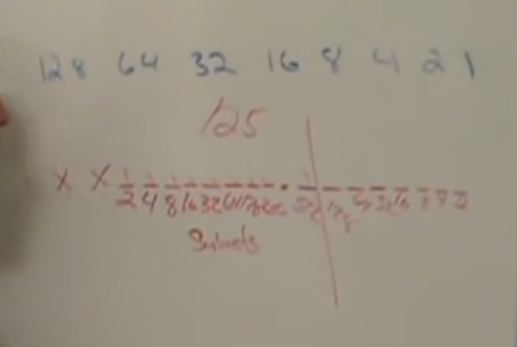
Find Network ID, Range and Broadcast Address from IP&Mask
- Example IP:
192.168.100.97/27 X.X.X.11100000(/27)- Network Increment: 32 (Line gets drawn at 32)
- Hosts: 31 (00000: 31)
| Network ID | Broadcast Address | Range |
|---|---|---|
| X.X.X.32 | X.X.X.63 | |
| X.X.X.64 | X.X.X.95 | |
| X.X.X.96 | X.X.X.127 | 97-126 |
| X.X.X.128 | ||
| … |
IPv4 and IPv6 addresses representation
2001:0db8:c9d2:0012:0000:0000:0000:0051
2001:db8:c9d2:12::51

2001:0db8:ab00:0000:0000:0000:0000:0000
2001:db8:ab00::

0000:0000:0000:0000:0000:0000:0000:0001
::1
- The address
::1is the loopback address. It always means “this machine I’m running on now”. In IPv4, the loopback address is 127.0.0.1. - Other than complete ipv4 and ipv6 address there’s a compatibility mode to represent ipv4 address in ipv6
- 192.0.2.33 can be written as
::ffff::192.0.2.33
- 192.0.2.33 can be written as
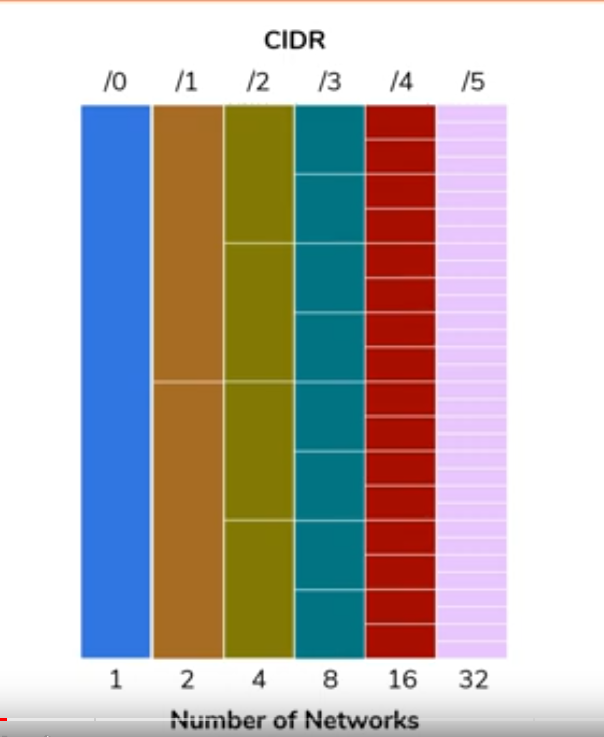
Subnetting Intro
Taking a network and dividing it into sub-networks.

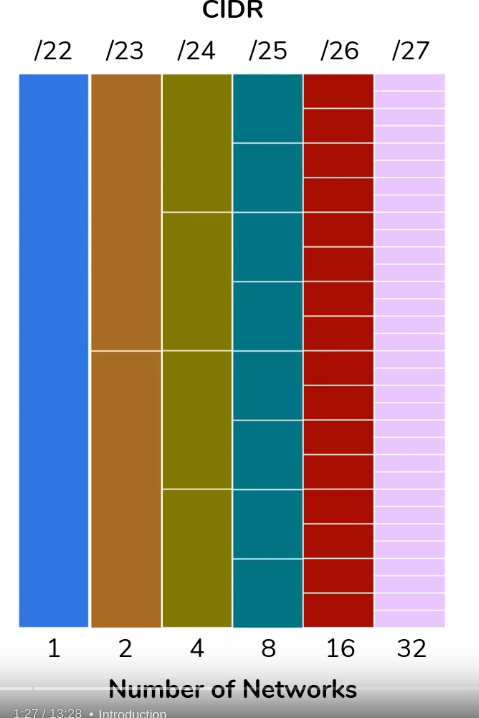
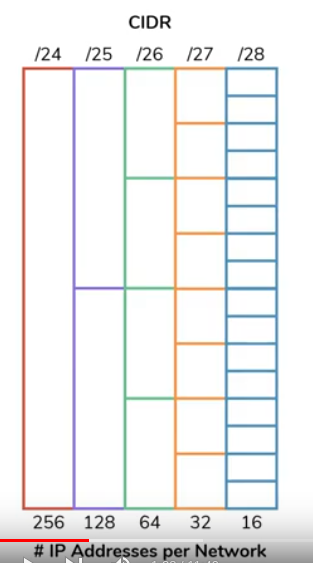
Multihoming vs IP aliasing
- Multihoming: Host level. When a host is connected to more than one network.
- IP Aliasing: Interface level. IP aliasing is associating more than one IP address to a network interface.
Point to Point networks
These masks are not supported by every router. Windows doesn’t support it?
/30: 4 addresses (failsafe ptp since this will work with ALL equipment.)/31: 2 addresses (ptp and tunnel configs)/32: 1 address (loopback, interfaces, matching hosts in ACLs etc., ISP assigning you an IP)