Javascript
- tags
- Programming Languages , Typescript
Data types and values
Values
Primitive(7)
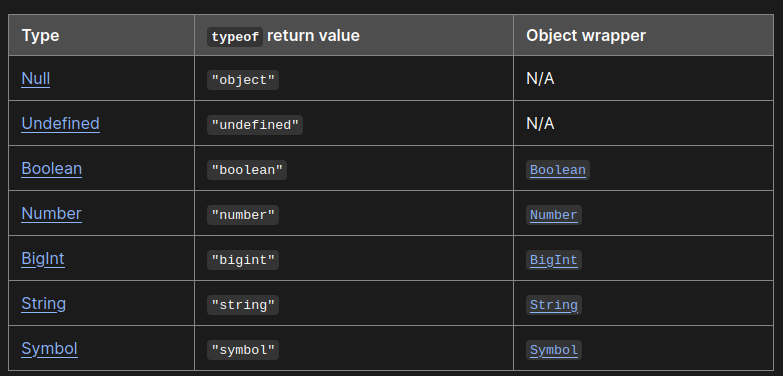
- Immutable
- undefined, number, string, boolean, symbol, bigint are not
objects, they’re primitives. - primitive and variable assigned a primitive value are different
- No methods, no properties: But JS has wrapper around primitives. Eg.
stringprimitive has the ephemeralStringobject wrapper which gives it nice methods likeincludes. Sometimes called the “auto-boxing behavior” - All primitive types, except
nullandundefined, have their correspondingobjectwrapper.
Non-primitive/objects
- Mutable
- Definition:
objectscan be seen as a collection ofproperties/methods objectcan havepropertiesandmethods, none, one or both.- Most things except primitives are objects. Even functions.
More on non-primitive/objects
FAQ on Object & object
-
Using Object as a map
- I used to use
Objectas map/dictionary for storing k-v data. - Not good, because it has all the extra property things that we don’t care about. It’s like taking an airplane to go 2kms. Use
Mapinstead.
- I used to use
-
What about
[object Object]?- String representation when
toString()is used. Object.prototype.toString()returns"[object Type]"Typeis set bySymbol.toStringTag- When
Symbol.toStringTagis unset, it’ll just go[object Object]
- String representation when
object vs Object
object- There’s nothing tangible called
objectin JS. It’s a concept. It’s anything that has properties, it’s anything that’s not a primitive. - Issues w
typeof- One source of confusion is the
typeofoperator. For anything other than a pre-defined list it’ll return “object”. This just signals that it’s some object, something’s that’s not a primitive. (typeofis like a limited best effort thing) - Eg.
typeof new Date()andtypeof nullboth return ‘object’. So for differentiating between subtypes, maybe useinstanceof - So
typeofis good if you just want to work onprimitivevalues.
- One source of confusion is the
- There’s nothing tangible called
Object- JS has many built in
objects,Object(w the capitalO) is one of them. - Other common
objectsare Function, Array, Date, RegExp, Error etc. Objectbehaves the same as{}(Object literal)// object literals are cool const obj = { // __proto__ __proto__: theProtoObj, // Shorthand for 'handler: handler' handler, // Methods toString() { // Super calls return "d " + super.toString(); }, // Computed (dynamic) property names ["prop_" + (() => 42)()]: 42, };- Every
objectin JS is inherited ofObject.prototype
- JS has many built in
Properties
propertyis an association between a name (or key) and a value. When the value of apropertyis afunction, we call it amethod.- Can be “assigned”, or can be set via
attributesusingObject.defineProperty - There are hidden/internal properties, usually represented via
[[. eg.[[Prototype]]. - JS objects have properties. They’re of 2 types.
- Data property: value, writable, enumerable, configurable
- Accessor property: get, set, enumerable, configurable
-
Prototype
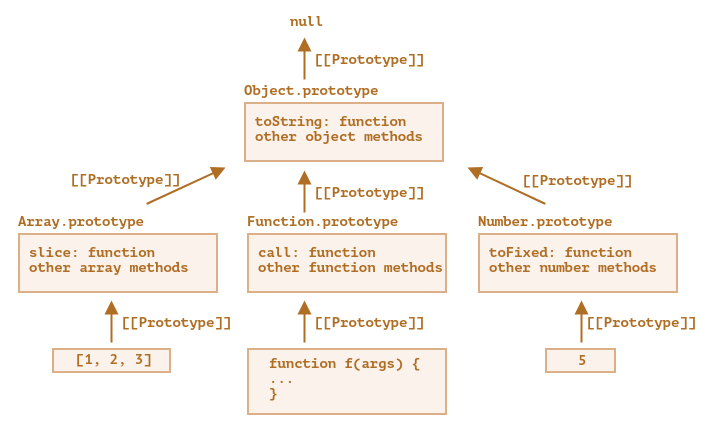
prototypeof anobjectis conceptually a hiddenpropertyprototypeof points to anotherobjector tonull- Usually represented using
[[Prototype]], sometimesobj.__proto__but that’s not official. - WATCHOUT:
Functions(constructors) have a.prototypeproperty, that’s different. It specifies what the[[Prototype]]should be for newly created objects using the constructor.
Other stuff
Functions
this
- It has 5 perspective, check javascript garden ref. for solid info
- arrow functions are cool, when using them
thiswill point parent(past hack: bind, self etc.), it does not have its ownthis. So ez.
apply/call/bind
- These help us explicitly set
parametersusingthis - The first
parameterof these functions point to thethisArg(what shouldthispoint to) call- Lets us call some function by explicitly setting
this - Don’t need it usually
- Lets us call some function by explicitly setting
apply- like
callbut lets us pass array of arguments - Earlier we needed to do things like
Math.max.apply(null, nums), now we don’t need it cuz spread operator - Don’t need it usually
- like
bind- Lets us build new functions out of
parameters - Related to the idea of currying
- Lets us build new functions out of
Closures
- A closure is formed by
- Returning from a function from the execution context of a function call and referencing that inner function to a property of another object.
- Directly assigning a reference to such a function object to, for example, a global variable, a property of a globally accessible object or an object passed by reference as an argument to the outer function call.
Promises
- Check the execution order here
- Not to mention, these are
objects catch(failureCallback)is short forthen(null, failureCallback)- If your error handling code is the same for all steps, you can attach
catchit to the end of the chain - The handlers we pass to
.thenand.catchNEED toreturn. Otherwise we end up creating a race condition. - When we do
.then(()=> doSomething())we mean.then((IGNORE_RESULT_HERE)=> doSomething()) - Good habit to always have a
.catch async/awaithelps avoid most of the catches here.Promise.allruns things concurrently(doesn’t check order), We can usereduceto run things sequentially . But make sure you want to run things sequentially. In general if simply chaining with.then, then things will be invoked in order.
Nested or flat?
const listOfIngredients = [];

doSomething()
  .then((url) =>
    fetch(url)
      .then((res) => res.json())
      .then((data) => {
        listOfIngredients.push(data);
      }),
  )
  .then(() => {
    console.log(listOfIngredients);
  });

// OR

doSomething()
  .then((url) => fetch(url))
  .then((res) => res.json())
  .then((data) => {
    listOfIngredients.push(data);
  })
  .then(() => {
    console.log(listOfIngredients);
  });
- Simple promise chains are best kept flat without nesting
- nested chains can be useful if you want to scope
catch/ error silencing, eg. do not make failure of some optional chain fail the whole thing.
Mix callbacks and promises?
- Not a good idea to mix callbacks and promises
- Better to just convert the callback thing into a promise.
const wait = (ms) => new Promise((resolve) => setTimeout(resolve, ms));
await
- for loop / for-loop and wait
Typed Arrays
const buffer = new ArrayBuffer(16); // just the buffer
const int32View = new Int32Array(buffer); // we add a view to the buffer
const int16View = new Int16Array(buffer); // we add another view to the same buffer!

// data objects containing multiple data types
const buffer = new ArrayBuffer(24);
const idView = new Uint32Array(buffer, 0, 1);
const usernameView = new Uint8Array(buffer, 4, 16);
const amountDueView = new Float32Array(buffer, 20, 1);
- These are very different things technically from
Array - Implementation:
ArrayBuffer+view/context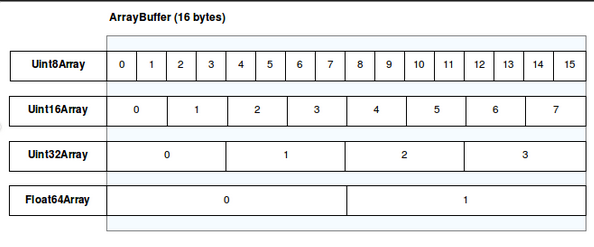
ArrayBuffer: Just chunks of data, no methods nothing. fixed-length binary data buffer.view/context/Dataview: data type, starting offset, and number of elements etc.
- It’s not accessible directly
, instead you use the different
views, examples some predefinedviews.
- If you need custom view, might look at
Dataview, it gives you low level access and can change things like change the byte order.
Random notes
- You can also use the unary plus
+as a shorthand forNumber() ??(Nullish coalasing is cool)- JS now has
?.like Ruby - If you pass any other object to the index signature the JavaScript runtime actually calls .toString on it before getting the result.
Versions
- ES6/ES2015
- ES7/ES2016: array.include, etc
- ES2017
- ES2018
- ES2019
- ES2020
- ES2021
- ES2022